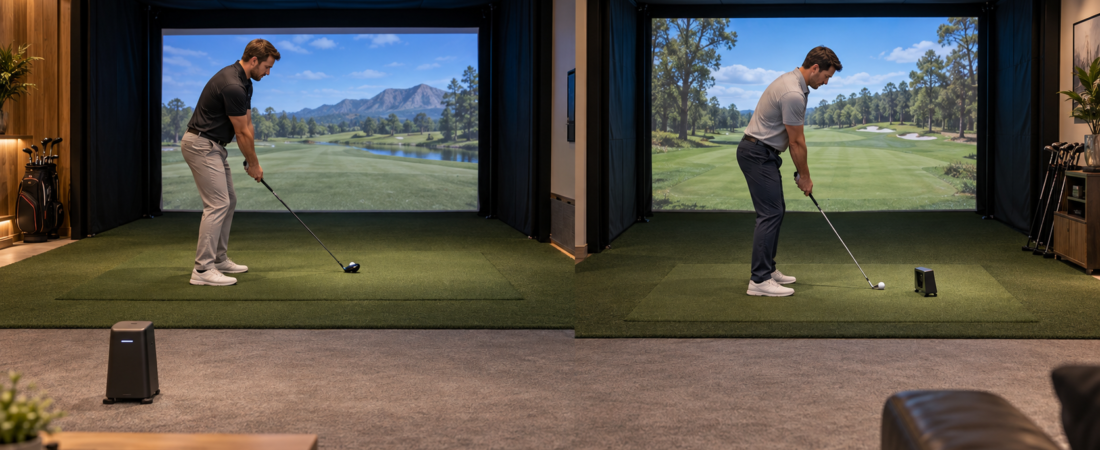
Start with the room rather than the technology
Radar-based and camera-based launch monitors can both provide accurate, useful information. The important difference for a homeowner is how each system gathers that information. A radar unit commonly sits behind the golfer and observes the club and ball as the shot travels toward the screen. A camera-based unit usually watches a smaller area around the ball from the floor or ceiling.
That difference affects the simulator’s overall layout. It can determine how much room depth you need, whether equipment sits beside the ball, and how easily right- and left-handed players can switch. Before comparing data points or course libraries, decide which monitor type can operate comfortably in the room you actually have.
How a radar monitor uses the room
A radar launch monitor sends a signal toward the club and ball and studies the signal that returns. In a typical indoor setup, the monitor sits on the floor behind the golfer. It needs enough distance to observe the strike and enough ball flight between the hitting position and the screen to measure the shot properly.
This arrangement keeps the area beside the ball open, which many golfers prefer. It can also make the system easier to use for both right- and left-handed players because the monitor may remain behind them. Many radar units are portable enough to take outdoors. The tradeoff is that the room must accommodate the monitor-to-ball distance and the ball-to-screen distance. Those measurements vary by model and should come from the manufacturer, not from a general simulator diagram.
The surrounding room can matter, too. Metal objects, moving fans, fluorescent fixtures, reflective surfaces, and nearby equipment may interfere with some systems. Newer products may combine radar with cameras or other optical tracking, so the word radar does not automatically mean that lighting is irrelevant. Mark the monitor, ball, and screen positions on a scaled room plan before committing to the enclosure or projector.
How a camera monitor uses the room
Camera-based monitors take a rapid series of images during impact. A floor model usually sits close to the ball and watches a defined hitting area. An overhead model is mounted above that area, leaving the floor clear.
Because the camera studies the shot over a short distance, this type of monitor may work in a room that is not deep enough for a behind-the-player radar system. It does not reduce the space needed for a full swing or the distance needed between the ball and impact screen. It only changes the space the monitor itself needs to measure the shot.
A portable floor camera can be convenient for one golfer, but its position may become awkward when a left-handed and right-handed player share the room. Depending on the model, the unit may have to be moved, realigned, or recalibrated. An overhead camera avoids that floor-level move, although it requires a secure mount, compatible ceiling height, power and data routing, and a hitting zone large enough for every expected user.
Let room depth eliminate options early
Room depth is one of the easiest ways to narrow the choices before spending time on feature comparisons. Measure from the screen wall to the nearest rear obstruction. Then account for the gap behind the impact screen, the distance from the screen to the ball, the golfer’s backswing and follow-through, the monitor’s required position, and a safe path through the room.
If the manufacturer requires more depth than the room provides, software features and attractive pricing cannot fix the mismatch. The same principle applies to an overhead monitor that cannot be mounted at its required height. Treat every published dimension as a requirement for that particular model. Two launch monitors advertised for indoor use may need very different rooms.
Decide whether portability will be used
Portability matters when the same monitor will be used indoors during winter and at a driving range during warmer weather. Many radar units and some camera units are designed for this kind of movement. That flexibility can prevent the homeowner from buying separate devices for indoor and outdoor practice.
A portable monitor still has to be set up correctly each time. It may need a level surface, careful alignment, a charged battery or nearby power, a supported phone or computer, and an exact distance from the ball. If repeating those steps would discourage short practice sessions, a permanently mounted system may be more useful even though it cannot leave the room.
A ceiling-mounted unit is best suited to a dedicated simulator. Once it is installed and calibrated, the room can be ready with very little preparation. That convenience has less value in a garage that must be cleared often or in a home where the owner expects to move soon.
Plan lighting and projector placement together
Any system that uses cameras must see the ball clearly, and some models also track the club. Deep shadows, glare, uneven light, or a fixture aimed into a sensor can interfere with tracking. At the same time, too much stray light on the impact screen can make the projected image look pale.
The usual solution is controlled light over the hitting zone with less light falling on the screen. Review the launch monitor’s lighting instructions while planning the projector and room fixtures. Waiting until the monitor is installed can leave the homeowner choosing between reliable tracking and a clear projected image.
Think through right and left handed use
A monitor chosen for one golfer can be positioned around that person’s usual stance; a shared simulator needs a more flexible plan. Ask whether the device reads shots from both sides without moving and, if it must move, whether repositioning is simple or requires a new alignment and calibration.
An overhead monitor with a broad hitting zone often makes shared use easier. A radar unit behind the golfer may also work well from either side. A floor camera can still be a sensible choice when opposite-handed golfers use the room only occasionally. The key question is how often the change will occur and whether the room provides safe swing clearance from both sides of the ball.
Compare the complete cost of using the system
The purchase price is only one part of launch monitor ownership. Compare the ball and club data included at each price level, whether marked balls or club stickers are required, which computers or mobile devices are supported, and which simulation programs work with the unit. Check whether the courses or features you want require an annual subscription.
Warranty coverage, technical support, internet requirements, calibration, and replacement options also affect the experience. A less expensive monitor may lead to a more expensive project if it requires a new computer or recurring software plan. Price the monitor as part of the complete simulator rather than as an isolated device.
Choose the monitor that fits the finished room
A radar-based monitor often fits well when the room provides the required depth, and the owner values portability or behind-the-player placement. A camera-based floor unit can suit a shallower room when a device beside the ball is acceptable. An overhead camera system can make sense in a dedicated room where a clear floor and easy use by golfers on both sides justify permanent installation.
Before buying, draw the complete room and mark every required distance. Confirm the lighting, mounting, computer, and software needs as well. The best launch monitor is not simply the one with the longest feature list. It is the one that can operate reliably in the available space and support the way the household expects to practice and play.