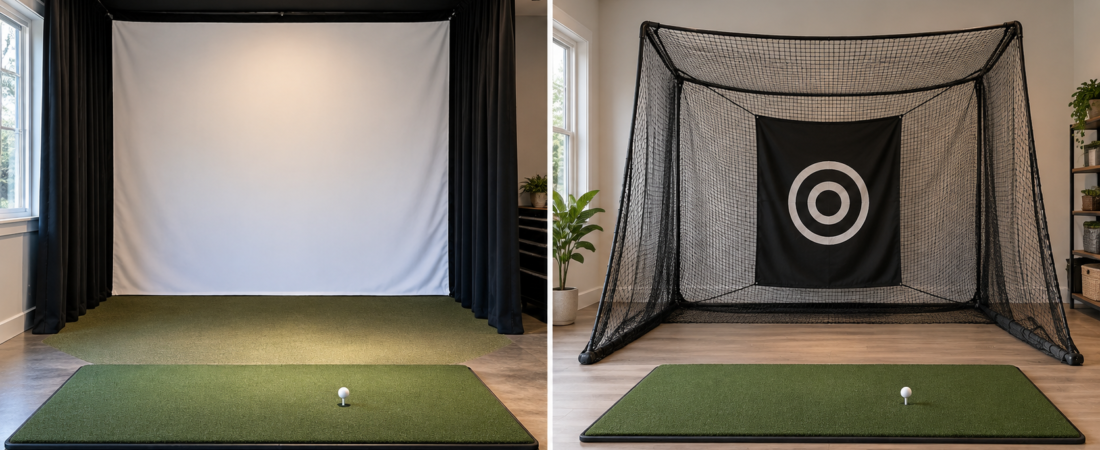
A golf net and an impact screen can both stop full golf shots, but they create very different indoor practice experiences. A net is often the simpler, less expensive choice, while an impact screen lets you project the simulated course directly in front of the golfer.
Either option can work with a launch monitor. With a net, you can display shot data and simulated ball flight on a television, computer, tablet, or separate monitor. With an impact screen, a projector can display that information on the same surface receiving the golf ball.
The better choice depends on the room, budget, desired level of immersion, and whether the setup must be portable. Consider safety, equipment compatibility, and available space before choosing either.
What Is the Main Difference?
A golf net is designed primarily to catch and contain the ball. You can use it for basic practice or combine it with a launch monitor and a separate display to create a functional simulator setup.
An impact screen absorbs golf-ball impacts while also providing a surface for a projected image. It allows the golfer to look toward the target and watch the simulated shot continue from the point of impact.
The impact screen usually becomes part of a larger enclosure that includes framing, side barriers, and upper protection. A net can be a standalone product, although additional barriers may still be necessary to contain missed shots.
When a Golf Net Makes Sense
A golf net can be a practical choice for golfers who primarily want shot data and practice feedback rather than a fully projected course. It may work well with a portable launch monitor and a television, tablet, or computer positioned safely beside the hitting area.
You can assemble, move, or store nets more easily than a framed screen enclosure. This can make them useful in garages, shared rooms, outdoor areas, or other spaces that cannot remain dedicated to golf.
A net can also provide an affordable starting point for someone building a simulator in stages. The launch monitor and hitting mat can be purchased first, with a projection screen or more complete enclosure added later.
When an Impact Screen Is the Better Choice
An impact screen is generally the better choice for an immersive simulator experience. The golfer can aim toward the projected course, see the shot appear in front of the hitting position, and use the room for simulated rounds and practice.
A screen also creates a large display that can sometimes be used for movies, sporting events, or other entertainment when the simulator isn’t in use. The final image quality depends on the screen material, projector, lighting, resolution, and screen tension.
A permanent or retractable impact-screen system can give the room a more finished appearance. It also provides a natural foundation for adding side protection, ceiling coverage, and a fully enclosed simulator.
Compare the Space Requirements
A portable net may occupy less permanent space, but the golfer still needs enough height, width, and depth to swing safely and satisfy the launch monitor’s requirements. A compact product does not automatically make a small room suitable for golf.
An impact screen requires open space behind it so the material can flex without contacting the wall. The room must also accommodate the enclosure, distance from strike to screen, projector, and any side or ceiling protection.
Measure both the stored and operating dimensions of a portable system. A net or retractable screen may be easy to put away but still require nearly the same open swing area when deployed.
Consider Safety and Ball Containment
Neither a net nor an impact screen alone protects the room from every possible shot. Shanks, hooks, slices, topped balls, and high wedges can miss the main target area.
A standalone net may need side barriers, upper netting, or additional protection around nearby walls and equipment. An impact screen generally needs an enclosure or surrounding protective system for the same reason.
Check the product’s intended use, dimensions, installation instructions, and condition before hitting full shots. A practice net not designed for full-speed golf balls should not be assumed safe simply because it appears strong.
Noise and Bounceback Can Differ
A properly installed golf net can absorb the ball gradually and may produce less impact noise than a tightly mounted screen. Results vary by net material, depth, frame, and whether the system is designed to return the ball.
Impact-screen noise and bounceback depend on the screen material, tension, rear clearance, ball speed, and hitting distance. A screen pulled too tightly or positioned too close to a hard wall may return the ball more forcefully.
Neither option should produce uncontrolled rebounds toward the golfer. Begin with controlled shots after installation and stop if the ball response appears unsafe or unpredictable.
Compare Image Quality and Visibility
A standard golf net does not provide a suitable surface for a clear projected image. The golfer must view the simulated shot on a separate display unless the net system accepts a compatible projection-screen attachment.
Impact screens vary in smoothness, brightness, durability, and resistance to visible ball marks. Premium materials may produce a sharper image and block more light, while more economical screens may show more texture or movement.
The screen’s proportions should also match the projector and desired image format. Choosing the screen before confirming the aspect ratio can result in unused space, cropping, or a distorted image.
Think About Durability and Maintenance
Inspect both nets and impact screens regularly for worn fibers, loose attachments, damaged seams, and changes in ball response. Small signs of wear can become larger failures when repeatedly struck at full speed.
Use impact screens with clean, undamaged golf balls. Dirt, marker residue, cuts, and rough ball surfaces can transfer marks or increase wear on the screen.
A net used outdoors may also be affected by sunlight, wind, moisture, and temperature changes. Follow the manufacturer’s storage and care instructions rather than assuming an indoor product can remain outside permanently.
A Hybrid System May Be an Option
Some golf-net systems accept a compatible simulator screen that attaches within or in front of the net. This lets a golfer start with a practice net and add projection later without replacing the entire system.
Compatibility should be confirmed before purchase. The added screen must fit correctly, absorb full-speed shots, and preserve the net’s intended ball containment and return features.
A hybrid setup offers flexibility, but it may not match the same screen size, image quality, or finished appearance of a dedicated simulator enclosure. Compare the complete operating dimensions and equipment requirements before deciding.
The Bottom Line
Choose a golf net when portability, simplicity, or a lower initial cost matters more than projecting the course directly in front of the golfer. A net paired with a launch monitor and separate display can still provide useful practice and simulation.
Choose an impact screen when you want a more immersive, permanent, or entertainment-focused simulator. The screen, projector, enclosure, and surrounding protection can work together to create a more complete indoor golf experience.
Neither option is automatically right for every room. Measure the space, confirm launch-monitor compatibility, and plan for missed shots before purchasing the primary ball-stopping system.